
Pen File Upload2.1 - Google Play
You'll be able to see results in few seconds.
Publisher Description
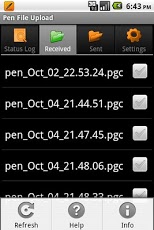
Need to send signature data from a digital pen directly to a remote server over the internet?
Pen File Upload automates the process of receiving files from a bluetooth enabled digital pen and uploading the files to your server for processing. This eliminates the need to dock your pen and manually transfer data.
Pen File Upload includes:
✔ An extensive Help menu to assist with pairing your digital pen with your phone.
✔ An internal Bluetooth Service to resolve Bluetooth issues with some devices that block unknown file types such as Anoto pgc files.
✔ Separate folders to track received and sent files.
✔ Ability to upload GPS location and identity data along with pen (pgc) file.
✔ Optional automated renaming of date based file names prior to uploading.
✔ A Status Log of all Activities.
✔ Support for the Swedish Language .
In addition, with Pen File Upload you can:
✔ Specify the exact url to your server.
✔ Specify server timeout parameters.
✔ Have your phone vibrate to indicate success or failure when a pen file is uploaded
✔ Specify the file extensions of files to process.
✔ Upload files automatically or manually.
✔ Specify the number of sent files to keep locally.
Pen File Upload has been tested using the Anoto DP-201 pen and on both phones and tablets including Samsung and HTC devices.
Search Terms:
Anoto DP-201
Maxell DP201
Destiny Logitech io2
Digital Pen
Objectif Lune
Planet Press Capture
Expedata
File Transfer
File Upload
PGC
Xpaper
XMS Penvision
About Pen File Upload
The company that develops Pen File Upload is Akalom Inc.. The latest version released by its developer is 2.1.
To install Pen File Upload on your Android device, just click the green Continue To App button above to start the installation process. The app is listed on our website since 2013-10-30 and was downloaded 0 times. We have already checked if the download link is safe, however for your own protection we recommend that you scan the downloaded app with your antivirus. Your antivirus may detect the Pen File Upload as malware as malware if the download link to com.akalom.pppen is broken.
How to install Pen File Upload on your Android device:
- Click on the Continue To App button on our website. This will redirect you to Google Play.
- Once the Pen File Upload is shown in the Google Play listing of your Android device, you can start its download and installation. Tap on the Install button located below the search bar and to the right of the app icon.
- A pop-up window with the permissions required by Pen File Upload will be shown. Click on Accept to continue the process.
- Pen File Upload will be downloaded onto your device, displaying a progress. Once the download completes, the installation will start and you'll get a notification after the installation is finished.
Program Details
System requirements
Download information
Pricing
Version History
version 2.1
posted on 2013-10-30
Pen File Upload Version 2.1 modifications:,NOTE: If you are upgrading, you must unpair, then repair your Anoto pen to work properly with the new Bluetooth service.,✔ An internal Bluetooth Service to resolve Bluetooth issues with some devices that block unknown file types such as Anoto pgc files.,✔ Improved support for Android Tablets.,✔ Optional auto restart when your device is rebooted.,✔ Support for the Swedish Language.,✔ Ability to control the number of sent files to keep.
version 1.6
posted on 2011-10-20
Several fixes and updates
Disclaimer
Official Google Play Link
We do not host Pen File Upload on our servers. We did not scan it for viruses, adware, spyware or other type of malware. This app is hosted by Google and passed their terms and conditions to be listed there. We recommend caution when installing it.
The Google Play link for Pen File Upload is provided to you by apps112.com without any warranties, representations or guarantees of any kind, so access it at your own risk.
If you have questions regarding this particular app contact the publisher directly. For questions about the functionalities of apps112.com contact us.
